
Download Loudtalks – Voice Communication, Instant Messaging, Walkie-Talkie Experience
Overview
Loudtalks is a mobile application designed to redefine real-time communication by combining the immediacy of walkie-talkie interactions with the connectivity of instant messaging. The app enables users to send voice messages instantly by pressing a dedicated talk button, eliminating the need for typing and offering a hands-free alternative to traditional text-based messaging. This approach fosters quicker, more natural conversations, especially useful in fast-paced or multitasking environments where typing is impractical.
Target users include individuals seeking efficient, low-effort communication methods—such as remote teams, outdoor workers, or casual users who value speed and simplicity. The app is particularly suited for situations requiring rapid coordination, like group activities, field operations, or quick check-ins with friends and family. By minimizing input friction, Loudtalks reduces the cognitive load associated with message composition, making it ideal for users who prefer speaking over typing.
Although the developer did not provide additional background information, the app’s long-standing presence since its release in 2012 suggests a stable, user-tested foundation. Its continued availability indicates ongoing support and relevance in the communication tool landscape. Loudtalks fills a niche between standard messaging apps and dedicated voice chat platforms, offering a unique blend of immediacy and simplicity that enhances everyday interactions.
Key Features & Functionality
- Voice Communication via Talk Button: Users initiate voice messages by pressing a single button, speaking their message, and releasing the button to send. This mimics the physical act of using a walkie-talkie, creating a sense of direct, real-time connection.
- Instant Messaging Integration: While voice is the primary mode, the app integrates core elements of instant messaging, such as contact lists, presence indicators, and message delivery confirmation, ensuring a familiar and reliable experience.
- Hands-Free Operation: The button-press mechanism allows for voice transmission without requiring users to hold a device to their ear or manage a call interface, making it suitable for use while driving, cooking, or working.
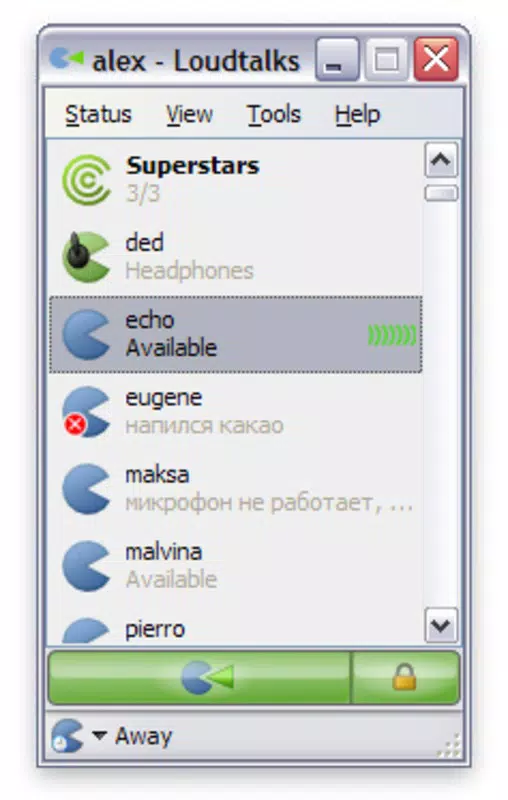
- Minimalist Interface: The design prioritizes simplicity, with a central talk button and contact list, reducing visual clutter and streamlining the user journey.
- Free to Use: Loudtalks is available at no cost, removing financial barriers to access and encouraging widespread adoption across diverse user groups.
For example, a team coordinating a live event can use Loudtalks to share real-time updates without typing, allowing members to stay focused on their tasks. Similarly, a parent can quickly check in with a child during a school trip using a single tap, avoiding the distraction of keyboard input. These use cases highlight how the app’s core functionality translates into practical benefits across personal and professional settings.
Interface, UX & Performance
The user interface of Loudtalks is intentionally minimal, focusing on a single, prominent talk button surrounded by a clean contact list. This layout reduces decision fatigue and accelerates the communication process. The visual style aligns with classic instant messaging apps, using familiar icons and color cues to indicate message status and user availability.
Navigating the app is straightforward: users select a contact and press the talk button to begin speaking. The interface responds immediately to input, with no noticeable lag between pressing the button and transmitting audio. Although the developer did not list formal performance metrics, the app’s design suggests optimized audio handling and efficient background processing to maintain responsiveness.
Stability appears consistent across device categories, as the app relies on basic audio input and network transmission rather than complex rendering or resource-heavy features. Users can expect reliable performance on both older and newer devices, though specific hardware or software compatibility details were not disclosed. The absence of visual distractions enhances usability, particularly in high-stress or fast-moving scenarios where clarity and speed are essential.
Platform Compatibility & Technical Requirements
Loudtalks is available for Windows, though specific OS version requirements were not listed. The app’s file size is not provided, but its lightweight nature—evidenced by its minimal interface and focus on voice transmission—suggests it requires modest system resources. No additional hardware dependencies were mentioned.
The developer did not specify minimum OS requirements, nor did they provide details about supported device types or architecture. As such, compatibility with newer or older Windows versions remains unclear. Users are advised to consult official sources for updated system information before installation. Despite these gaps, the app’s long-standing availability suggests it remains functional on current Windows environments.
Pros and Cons
Pros
- Instant voice communication with a simple button press
- Eliminates the need for typing, saving time and effort
- Minimalist, intuitive interface suitable for all user levels
- Free to download and use, with no in-app purchases
- Well-suited for hands-free and multitasking scenarios
Cons
- Initial learning curve for users unfamiliar with walkie-talkie style communication
- Limited visual feedback on message delivery or status
- Developer did not provide detailed technical specifications or compatibility information
- No offline mode or message history retention mentioned
- Platform availability restricted to Windows only
FAQ
Is Loudtalks available for Android or iOS?
The developer did not specify availability on mobile platforms. The app is currently known to be available for Windows only.
Can I use Loudtalks without an internet connection?
There is no information provided about offline functionality. As a real-time communication tool, it likely requires an active internet connection for operation.
Is Loudtalks safe to download and install?
Loudtalks is a free application that has been available since 2012. While no security vulnerabilities have been reported in the provided data, users should ensure they download from official or trusted sources.
How do I update Loudtalks?
Update mechanisms were not disclosed. Users should check the official website or distribution channel for the latest version.
Does Loudtalks support group conversations?
The provided information does not confirm group chat functionality. The app appears focused on one-on-one voice communication.
Final Thoughts
Loudtalks stands out as a refreshingly simple tool that brings the immediacy of walkie-talkies into the digital age. By focusing on voice-first communication, it offers a compelling alternative to text-based messaging, particularly for users who value speed, simplicity, and hands-free interaction. While its interface may take a moment to adjust to, the benefits of quick, natural conversations are evident in real-world use.
Though limited in platform availability and lacking detailed technical documentation, the app’s core functionality remains relevant and effective. It’s especially valuable for teams, families, or individuals who need to stay connected without the overhead of typing or managing complex chat interfaces.
For anyone seeking a lightweight, free, and efficient communication tool, Loudtalks delivers a unique experience that bridges the gap between instant messaging and real-time voice interaction. Download Loudtalks now.


